小红书批量封面:用 SVG 模板和脚本一次出 20 张
把封面文案写进 JSON,用 SVG 模板加 Sharp 批量渲染成 1080×1440 的封面图,不用一张张打开设计软件。
本页目录
30 秒速查
- 文案写
data/covers.json:title、subtitle、badge- 画布默认 1080×1440,
--size 9:16/--size 1:1换比例- 先确认字体存在,再跑
node scripts/render.mjs- 输出到
output/,先抽 3 张检查
适用场景
你需要连续发一批封面,标题不同、结构相同。手动做三张还行,二十张就会开始复制粘贴到出错。
这篇用一个最小方案解决它:文案放在 JSON 里,版式放在 SVG 里,脚本负责批量渲染。
初始化项目
mkdir cover-batch && cd cover-batch
npm init -y
npm i sharp
mkdir -p data output
Sharp 是 Node 里常用的图像处理库,安装时会下载对应平台的二进制,不需要额外配置。
先说清楚字体
SVG 里的中文能否正常显示,取决于运行脚本的机器上有没有对应字体。
- macOS 通常自带苹方,
font-family写PingFang SC。 - Windows 可以写
Microsoft YaHei。 - Linux 服务器建议先安装
Noto Sans CJK SC,否则可能渲染成方框。
一个稳妥的写法是把多个字体名串起来:
font-family: "PingFang SC", "Microsoft YaHei", "Noto Sans CJK SC", sans-serif;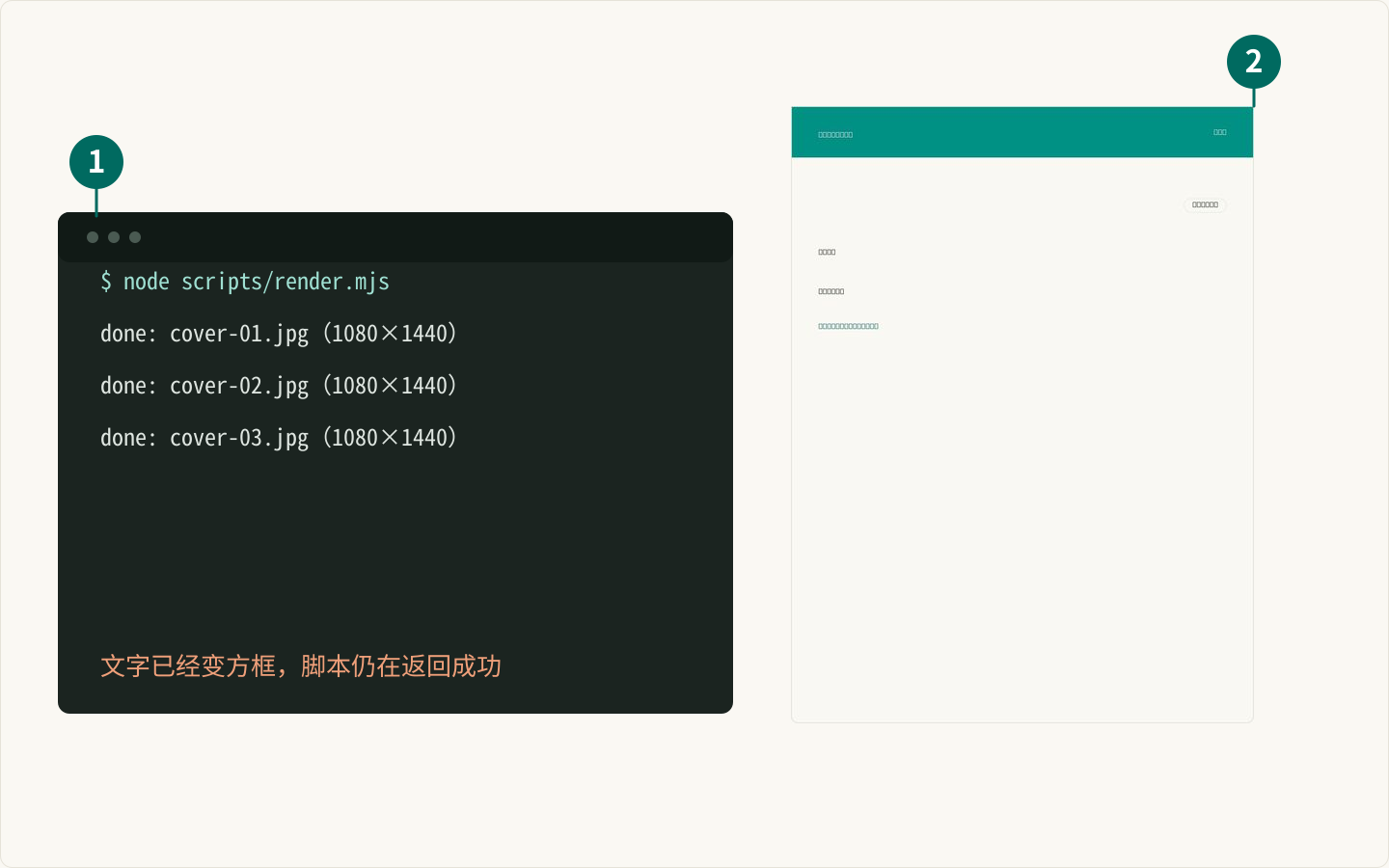
准备文案数据
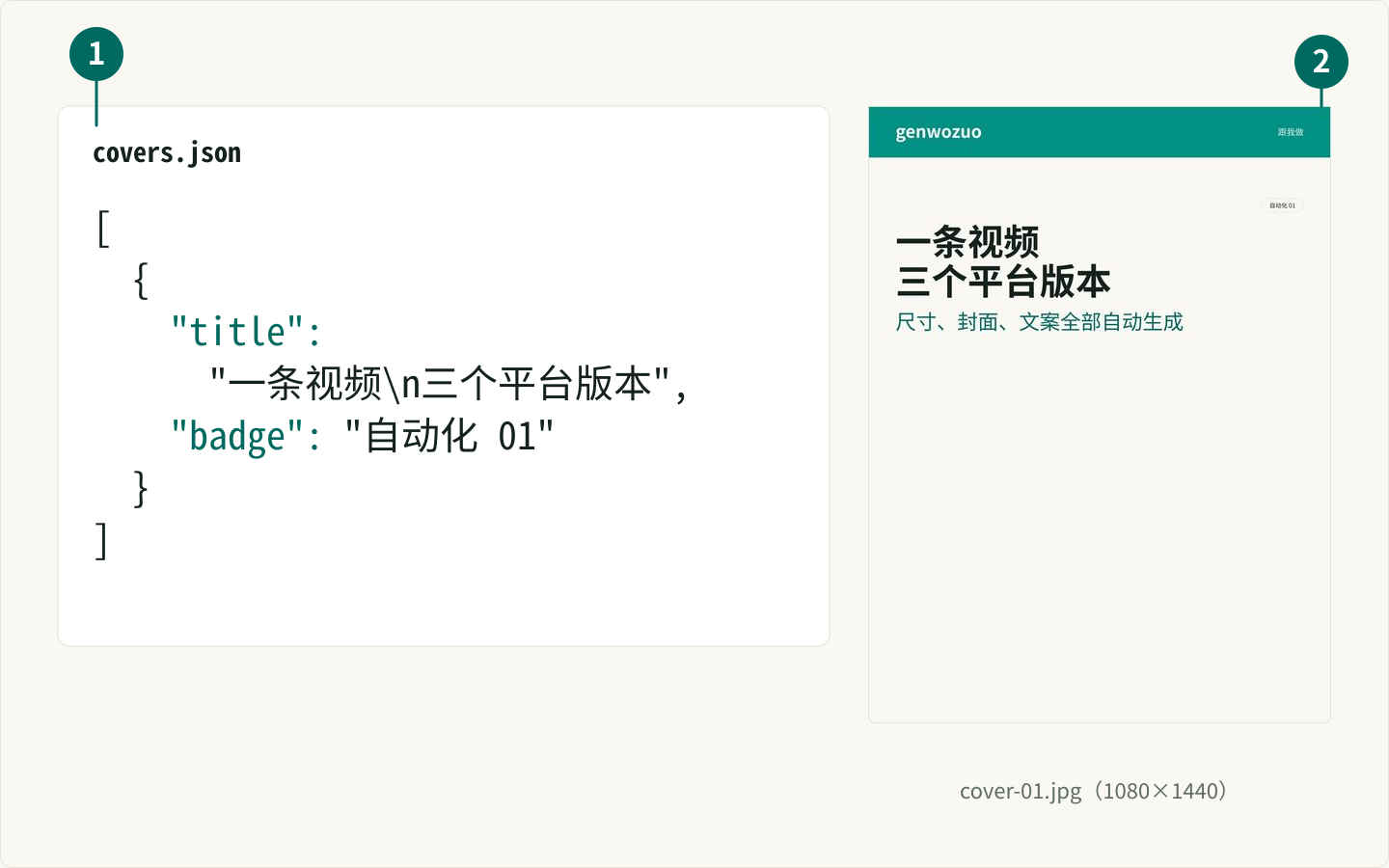
新建 data/covers.json。每条只需要标题、副标题和角标:
[
  {
    "title": "一条视频\n三个平台版本",
    "subtitle": "尺寸、封面、文案全部自动生成",
    "badge": "自动化 01"
  },
  {
    "title": "别再手动\n改视频尺寸了",
    "subtitle": "FFmpeg 批量处理,一次跑完",
    "badge": "自动化 02"
  },
  {
    "title": "20 张封面\n十分钟做完",
    "subtitle": "模板 + JSON + 一段脚本",
    "badge": "自动化 03"
  }
]
\n 用来手动换行。中文标题建议控制在每行 7 到 10 个字,三行以内。
写 SVG 模板
新建 scripts/render.mjs。完整脚本如下——模板写成函数,文字通过参数注入,最后再交给 Sharp 渲染成 JPG:
import sharp from "sharp";
import { readFile, mkdir } from "node:fs/promises";
import path from "node:path";
import { pathToFileURL } from "node:url";
const ROOT = import.meta.dirname;
const DATA_FILE = path.join(ROOT, "data", "covers.json");
const OUTPUT_DIR = path.join(ROOT, "output");
// 三档成品比例:宽度都是 1080,只换高。
export const SIZES = {
"3:4": { width: 1080, height: 1440 }, // 小红书
"9:16": { width: 1080, height: 1920 }, // 抖音 / 快手
"1:1": { width: 1080, height: 1080 }, // 闲鱼
};
export const DEFAULT_SIZE = "3:4";
export const WIDTH = SIZES[DEFAULT_SIZE].width;
export const HEIGHT = SIZES[DEFAULT_SIZE].height;
const FONT = "PingFang SC, Microsoft YaHei, Noto Sans CJK SC, sans-serif";
const COLORS = {
ink: "#14211d",
muted: "#5f6b66",
line: "#e5e2d8",
paper: "#faf8f3",
brand: "#009084",
brandText: "#006a60",
sand: "#f1ece1",
};
export function escapeXml(value) {
return String(value ?? "")
.replaceAll("&", "&")
.replaceAll("<", "<")
.replaceAll(">", ">")
.replaceAll('"', """)
.replaceAll("'", "'");
}
// 粗略字宽:中日韩与全角按 1em,拉丁字母数字按 0.56em,其余按 0.5em。
// SVG 没有自动换行,封面文案固定,估宽够用。
function unitWidth(unit, fontSize) {
if (/[\u3000-\u9fff\uff00-\uffef]/.test(unit)) return fontSize;
// 拉丁是一次匹配成一个词(如 SQLite),要按字符数乘开,否则整段只算一个字宽。
// 0.62em 是实测值(56px 粗体渲染后量出来的平均字宽)。
if (/^[A-Za-z0-9]/.test(unit)) return unit.length * fontSize * 0.62;
return fontSize * 0.55;
}
function tokenize(text) {
return text.match(/[\u3000-\u9fff\uff00-\uffef]|[A-Za-z0-9][A-Za-z0-9.,:_+-]*|\s+|[^\s]/g) ?? [];
}
function measure(text, fontSize) {
return tokenize(String(text ?? "")).reduce((sum, unit) => sum + unitWidth(unit, fontSize), 0);
}
/** 按宽度折行;文本里的 \n 视为强制换行,超过 maxLines 时截断并补省略号。 */
function wrapText(text, maxWidth, fontSize, maxLines) {
const paragraphs = String(text ?? "").split("\n");
if (paragraphs.length > 1) {
const lines = [];
for (const paragraph of paragraphs) {
const room = maxLines - lines.length;
if (room <= 0) break;
lines.push(...wrapParagraph(paragraph, maxWidth, fontSize, room));
}
return lines.slice(0, maxLines);
}
return wrapParagraph(paragraphs[0], maxWidth, fontSize, maxLines);
}
function wrapParagraph(text, maxWidth, fontSize, maxLines) {
const units = tokenize(String(text ?? "").trim());
const lines = [];
let line = "";
let width = 0;
let index = 0;
while (index < units.length) {
const unit = units[index];
index += 1;
if (/^\s+$/.test(unit)) {
if (line) {
line += " ";
width += fontSize * 0.28;
}
continue;
}
const w = unitWidth(unit, fontSize);
if (line && width + w > maxWidth) {
lines.push(line.trimEnd());
if (lines.length === maxLines) {
const rest = (units.slice(index - 1).join("")).trim();
if (rest) lines[lines.length - 1] = `${lines[lines.length - 1]}…`;
return lines;
}
line = unit;
width = w;
continue;
}
line += unit;
width += w;
}
if (line.trim()) lines.push(line.trimEnd());
return lines.slice(0, maxLines);
}
function textLines(lines, { x, y, fontSize, lineHeight, weight, fill }) {
return lines
.map(
(line, i) =>
`<text x="${x}" y="${y + i * lineHeight}" font-size="${fontSize}" font-weight="${weight}" fill="${fill}" font-family="${FONT}">${escapeXml(line)}</text>`,
)
.join("");
}
function pill({ x, y, label, fontSize, height, stroke, fill, color, anchorRight }) {
const padX = 16;
const width = Math.round(measure(label, fontSize) + padX * 2);
const left = anchorRight ? x - width : x;
return `<g>
<rect x="${left}" y="${y}" width="${width}" height="${height}" rx="${height / 2}" fill="${fill}"${stroke ? ` stroke="${stroke}"` : ""} />
<text x="${left + width / 2}" y="${y + height / 2 + fontSize * 0.36}" font-size="${fontSize}" font-weight="500" fill="${color}" text-anchor="middle" font-family="${FONT}">${escapeXml(label)}</text>
</g>`;
}
/**
* 生成一张封面 SVG。
*
* 版式(自上而下):青绿磁条(贴死顶部两角)→ 元信息行 → 标题 → 副标题 → 描述
* → 底行(左辅助标签 + 右工具图标)。
* 字段都可选,缺就不画:
* title 标题(56/700)
* subtitle 副标题(32/500,#006a60)
* description 描述(muted,3:4 与 9:16 最多 3 行,1:1 最多 2 行)
* info 描述下面的一行结构化信息,如「本机实测 · 0 元 · 4 分钟」
* meta 元信息,如「开发者 AI 实战 · 6 分钟 · 2026-10-26」
* mainLabel 右上角描边胶囊,如「Dev & AI」
* auxLabel 左下角浅底胶囊,如「SQLite」
* icon 工具图标的内层 SVG 字符串(按 32×32 画布缩放,站点用 tool-icons 喂)
* badge 兼容旧数据:没有 mainLabel 时显示在右上角
*/
export function buildSvg(entry = {}, { size = DEFAULT_SIZE, transparent = false } = {}) {
const preset = SIZES[size];
if (!preset) {
throw new Error(`未知比例 ${size},可选:${Object.keys(SIZES).join(" / ")}`);
}
const { width, height } = preset;
const pad = 64;
const barHeight = 120;
const contentWidth = width - pad * 2;
const descMaxLines = size === "1:1" ? 2 : 3;
const topGap = 96;
const bottomGap = 48;
// 每档的字号与对齐:3:4 与 9:16 内容靠上,1:1 维持居中。
const TYPE_SCALE = {
"3:4": { title: 84, subtitle: 48, desc: 32, align: "top", gap: 24 },
"9:16": { title: 104, subtitle: 56, desc: 40, align: "top", gap: 28 },
"1:1": { title: 56, subtitle: 32, desc: 24, align: "center", gap: 18 },
};
const scale = TYPE_SCALE[size];
const metaSize = 14;
const titleSize = scale.title;
const titleLine = Math.round(titleSize * 1.1);
const subtitleSize = scale.subtitle;
const subtitleLine = Math.round(subtitleSize * 1.25);
const descSize = scale.desc;
const descLine = Math.round(descSize * 1.5);
const infoSize = 16;
const infoGap = 24;
const iconSize = 56;
const meta = entry.meta ?? "";
const mainLabel = entry.mainLabel ?? entry.badge ?? "";
const auxLabel = entry.auxLabel ?? "";
const info = entry.info ?? "";
const icon = typeof entry.icon === "string" && entry.icon.startsWith("<") ? entry.icon : "";
const titleLines = wrapText(entry.title ?? "", contentWidth, titleSize, 3);
const subtitleLines = wrapText(entry.subtitle ?? "", contentWidth, subtitleSize, 2);
const descLines = wrapText(entry.description ?? "", contentWidth, descSize, descMaxLines);
const gap = scale.gap;
const metaRowHeight = meta || mainLabel ? 32 : 0;
const blockHeight =
metaRowHeight +
(metaRowHeight ? gap : 0) +
titleLines.length * titleLine +
(subtitleLines.length ? gap + subtitleLines.length * subtitleLine : 0) +
(descLines.length ? gap + descLines.length * descLine : 0) +
(info ? infoGap + infoSize : 0);
const topLimit = barHeight + topGap;
const bottomRowTop = height - bottomGap - iconSize;
const bottomLimit = bottomRowTop - 24;
// 海报式排版:信息在上、留白在下。只有 1:1 保持居中。
const start =
scale.align === "top"
? topLimit
: Math.round(topLimit + Math.max(0, (bottomLimit - topLimit - blockHeight) / 2));
let cursor = start;
const body = [];
if (meta) {
body.push(
`<text x="${pad}" y="${cursor + 22}" font-size="${metaSize}" font-weight="500" fill="${COLORS.muted}" font-family="${FONT}">${escapeXml(meta)}</text>`,
);
}
if (mainLabel) {
body.push(
pill({
x: width - pad,
y: cursor,
label: mainLabel,
fontSize: metaSize,
height: 32,
stroke: COLORS.line,
fill: "none",
color: COLORS.ink,
anchorRight: true,
}),
);
}
if (metaRowHeight) cursor += metaRowHeight + gap;
body.push(
textLines(titleLines, {
x: pad,
y: cursor + titleSize * 0.9,
fontSize: titleSize,
lineHeight: titleLine,
weight: 700,
fill: COLORS.ink,
}),
);
cursor += titleLines.length * titleLine;
if (subtitleLines.length) {
cursor += gap;
body.push(
textLines(subtitleLines, {
x: pad,
y: cursor + subtitleSize * 0.85,
fontSize: subtitleSize,
lineHeight: subtitleLine,
weight: 500,
fill: COLORS.brandText,
}),
);
cursor += subtitleLines.length * subtitleLine;
}
if (descLines.length) {
cursor += gap;
body.push(
textLines(descLines, {
x: pad,
y: cursor + descSize * 0.9,
fontSize: descSize,
lineHeight: descLine,
weight: 400,
fill: COLORS.muted,
}),
);
cursor += descLines.length * descLine;
}
// 描述与底行之间的一行结构化信息(本机实测 · 0 元 · N 分钟)
if (info) {
cursor += infoGap;
body.push(
`<text x="${pad}" y="${cursor + infoSize * 0.8}" font-size="${infoSize}" font-weight="500" fill="${COLORS.muted}" font-family="${FONT}">${escapeXml(info)}</text>`,
);
}
const foot = [];
if (auxLabel) {
foot.push(
pill({
x: pad,
y: bottomRowTop + 12,
label: auxLabel,
fontSize: metaSize,
height: 32,
fill: COLORS.sand,
color: COLORS.ink,
}),
);
}
if (icon) {
foot.push(
`<svg x="${width - pad - iconSize}" y="${bottomRowTop}" width="${iconSize}" height="${iconSize}" viewBox="0 0 32 32">${icon}</svg>`,
);
}
// 卡片轮廓:顶部两角直角(磁条贴死顶角),底部圆角 16。
const cardPath = `M1,1 H${width - 1} V${height - 17} A16,16 0 0 1 ${width - 17},${height - 1} H17 A16,16 0 0 1 1,${height - 17} Z`;
return `<svg xmlns="http://www.w3.org/2000/svg" width="${width}" height="${height}" viewBox="0 0 ${width} ${height}">
${transparent ? "" : `<rect width="${width}" height="${height}" fill="${COLORS.paper}" />`}
<rect x="0" y="0" width="${width}" height="${barHeight}" fill="${COLORS.brand}" />
<text x="${pad}" y="${barHeight / 2 + 14}" font-size="40" font-weight="700" fill="#ffffff" font-family="${FONT}">genwozuo</text>
<text x="${width - pad}" y="${barHeight / 2 + 8}" font-size="20" font-weight="500" fill="#e4efe9" text-anchor="end" font-family="${FONT}">跟我做</text>
${body.join("\n ")}
${foot.join("\n ")}
<path d="${cardPath}" fill="none" stroke="${COLORS.line}" stroke-width="2" />
</svg>`;
}
// 有 background 时:先把背景图裁成当前比例、压暗一点,再叠透明版 SVG;
// 没有就普通渲染(SVG 自带纸白底色)。
async function renderCover(entry, filename, size) {
if (entry.background) {
const { width, height } = SIZES[size];
const background = sharp(path.resolve(ROOT, entry.background))
.resize(width, height, { fit: "cover" })
.modulate({ brightness: 0.9 });
await background
.composite([
{ input: Buffer.from(buildSvg(entry, { size, transparent: true })), blend: "over" },
])
.jpeg({ quality: 92, mozjpeg: true })
.toFile(filename);
return;
}
await sharp(Buffer.from(buildSvg(entry, { size })))
.jpeg({ quality: 92, mozjpeg: true })
.toFile(filename);
}
// node render.mjs --size 9:16 / --ratio 1:1,不传就是 3:4。
function readSize(argv) {
const index = argv.findIndex((arg) => arg === "--size" || arg === "--ratio");
if (index === -1) return DEFAULT_SIZE;
const value = argv[index + 1];
if (!value || !SIZES[value]) {
throw new Error(
`--size 只支持 ${Object.keys(SIZES).join(" / ")},收到:${value ?? "(空)"}`,
);
}
return value;
}
async function main() {
const size = readSize(process.argv.slice(2));
const { width, height } = SIZES[size];
const suffix = size === DEFAULT_SIZE ? "" : `-${width}x${height}`;
const covers = JSON.parse(await readFile(DATA_FILE, "utf8"));
if (!Array.isArray(covers) || covers.length === 0) {
throw new Error(`${DATA_FILE} 里没有可渲染的文案`);
}
await mkdir(OUTPUT_DIR, { recursive: true });
for (const [index, cover] of covers.entries()) {
const filename = path.join(
OUTPUT_DIR,
`cover-${String(index + 1).padStart(2, "0")}${suffix}.jpg`,
);
await renderCover(cover, filename, size);
console.log(`done: ${filename}(${width}×${height})`);
}
}
if (import.meta.url === pathToFileURL(process.argv[1] ?? "").href) {
main().catch((error) => {
console.error(error);
process.exitCode = 1;
});
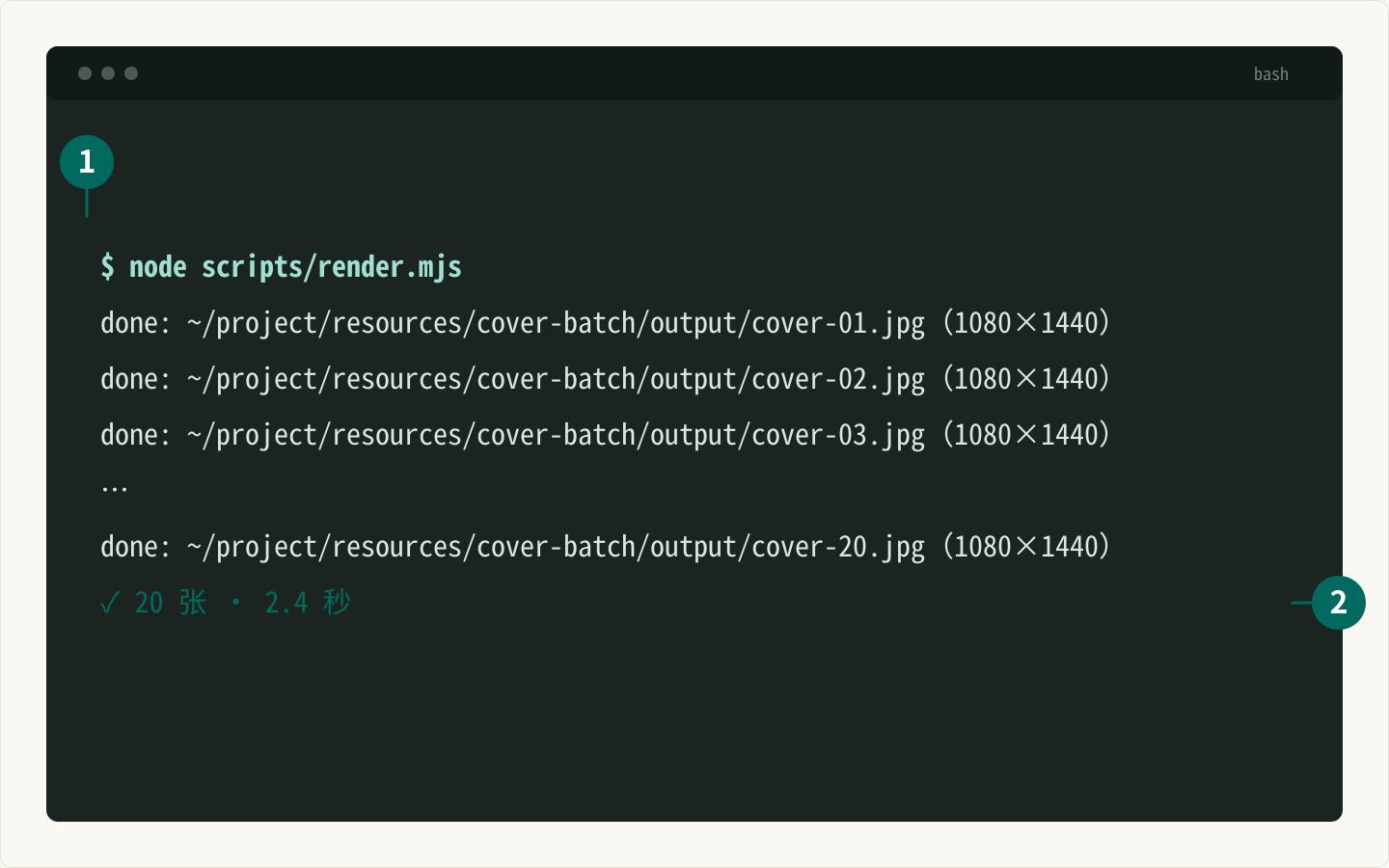
}运行:
node scripts/render.mjs三档比例在脚本里写好了,用 --size 切换(不传就是 3:4):
node scripts/render.mjs                # 小红书 3:4,1080×1440
node scripts/render.mjs --size 9:16    # 抖音 / 快手,1080×1920
node scripts/render.mjs --size 1:1     # 闲鱼,1080×1080
换比例时纵向版式按高度等比缩放,横向边距和字号基准不变;非 3:4 的成品文件名会带尺寸后缀(如 cover-01-1080x1920.jpg),避免和默认档互相覆盖。
几个容易踩的坑
1. 文本注入要转义
标题来自 JSON,如果里面有 &、< 或引号,直接拼进 SVG 会破坏结构。上面的 escapeXml 必须保留。
2. 行高和字号要一起算
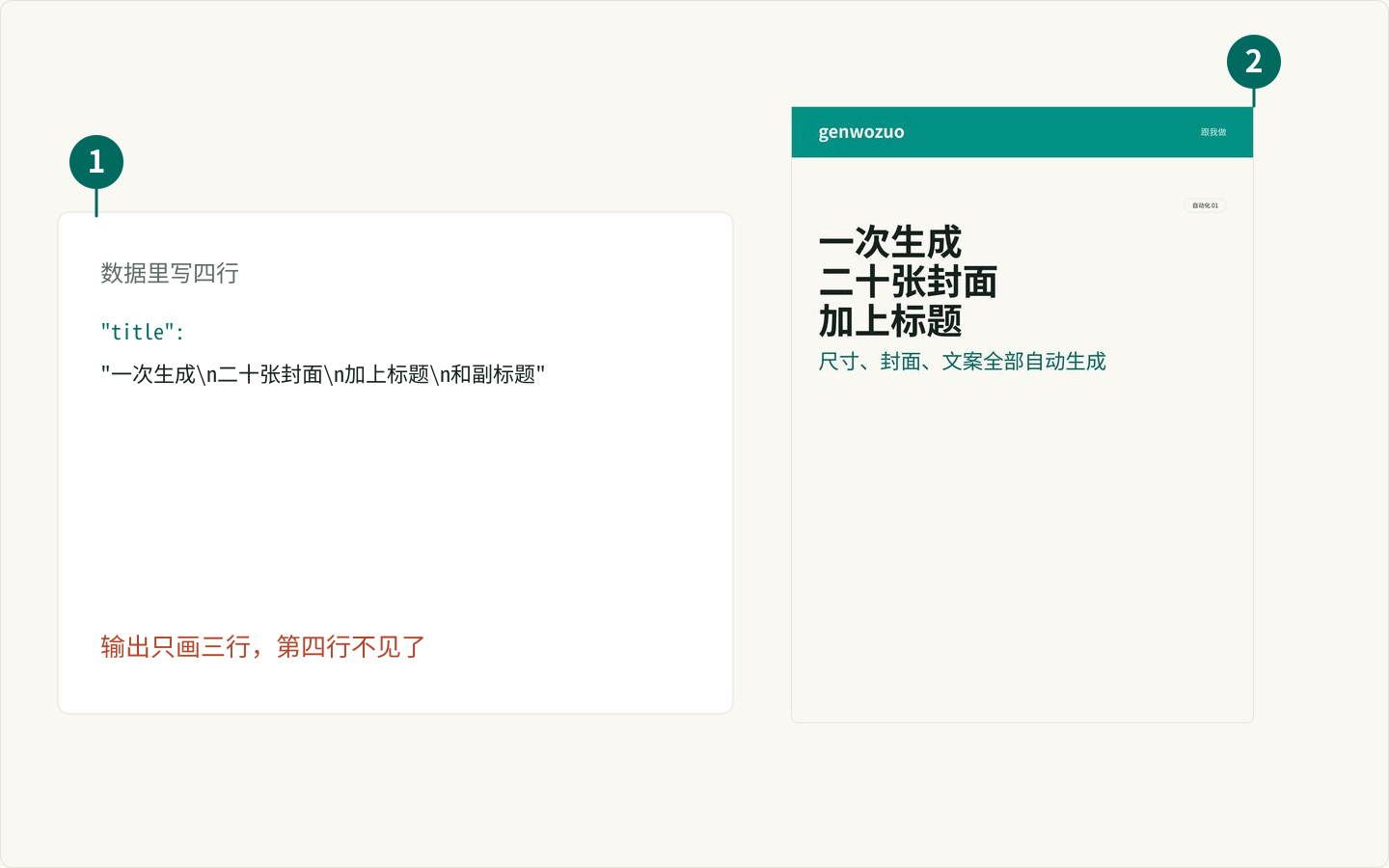
96px 字号配 128px 行高比较稳。三行标题占总高度约 384px,再留出副标题和底部信息的位置。标题超过三行就该缩字号或拆成两张。
3. 输出格式
小红书封面用 JPG 就够,质量 92 基本看不出压缩。需要透明背景或后续二次编辑时再输出 PNG。
4. 批量生成后要抽查
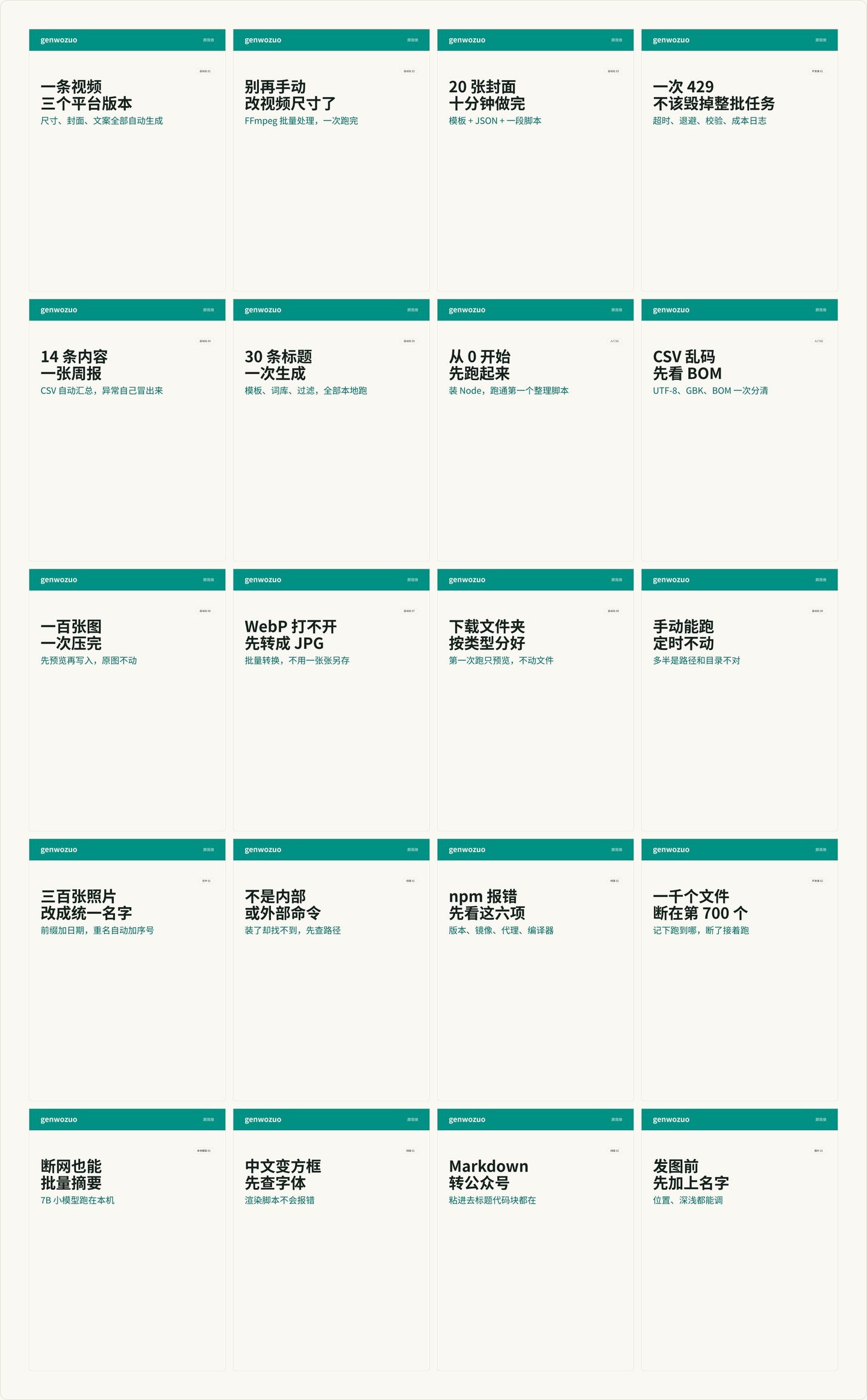
脚本只能保证尺寸和文字正确,不能保证文案不重复、不敏感。发布前至少抽查前五张,重点看三件事:标题有没有超过三行、副标题有没有被压住、中文有没有变成方框。文件名按顺序生成 cover-01.jpg、cover-02.jpg…,重复跑会直接覆盖;想留版本,就把 output/ 换成带日期的目录。
想加背景图怎么办
在 JSON 里加一个 background 字段,填相对脚本所在目录的图片路径就行,代码不用改——上面的脚本里 renderCover 已经处理好了:
- 有
background时,先用 Sharp 把背景图裁成当前比例(默认 1080×1440)、亮度压到 0.9,再叠加buildSvg(cover, { transparent: true })生成的透明版 SVG; - 没有
background时走普通流程,SVG 自带不透明底色。
关键在 transparent 选项:有背景图时不要再铺那层不透明的底色,否则背景会被完全盖住。卡片底色用的是 fill-opacity="0.92",让背景能透出一点。
如果背景太花,在 buildSvg 里加一层半透明白色矩形,文字会更清楚。
什么时候该换方案
这套方案适合版式稳定、只换文案的批量封面。遇到下面情况,换成 HTML + Playwright 更合适:
- 需要复杂排版、网格、多字体混排。
- 需要引用网页字体或远程图片。
- 需要精确还原设计稿。
但如果你只是想把 20 条标题快速变成 20 张能用的封面,SVG 方案更轻,也更容易维护。
下一步读什么
常见问题
为什么用 SVG 而不是直接截图 HTML?
SVG 不需要浏览器,渲染快、依赖少,适合批量。需要复杂排版或网页字体时,再换成 Playwright 截 HTML 更灵活。
中文字体渲染不出来怎么办?
Sharp 依赖系统字体。先在系统里安装思源黑体或苹方,再在 SVG 的 font-family 里写字体名。服务器上建议安装 Noto Sans CJK。
一次生成 20 张会不会很慢?
纯文字模板通常几秒内完成。主要耗时在图片合成和磁盘写入,和图片分辨率、数量成正比。
能自动配图吗?
可以。给每条文案加一个背景图路径,在合成前把背景图铺进 SVG 或作为 Sharp 的底层,再叠加文字层。
每周一张复习表
每周分享一张实用复习表,不收钱不打扰,想走随时走
邮箱存在 Cloudflare KV 里,只用来发每周更新;任何时候写信到hello@genwozuo.com说「退订」就删掉。详见隐私政策。