AI 返回的 JSON 不稳:加一层校验和重试
模型返回 200 不代表字段可用。用一个不依赖第三方库的 Node 脚本校验字段类型、数值范围和枚举,失败自动重试,仍失败就落盘人工看。
本页目录
30 秒速查
- 别只
JSON.parse:先校验字段类型和范围- 提示词里给出完整字段清单,要求只输出 JSON
- 失败重试 2 次,把错误回传给模型
- 跑
node resources/json-guard/guard.mjs response.json
这篇教程解决什么问题
模型返回了 200,JSON.parse 也过了,但 tags 是字符串不是数组,score 是 120 不是 0–100。批量跑完才发现,后面的排序、入库全乱了。
这篇加一层校验:字段类型、数值范围、枚举值。解析失败或校验失败都算失败,交给 guard 有限重试;仍失败就停下,让人看原始返回。
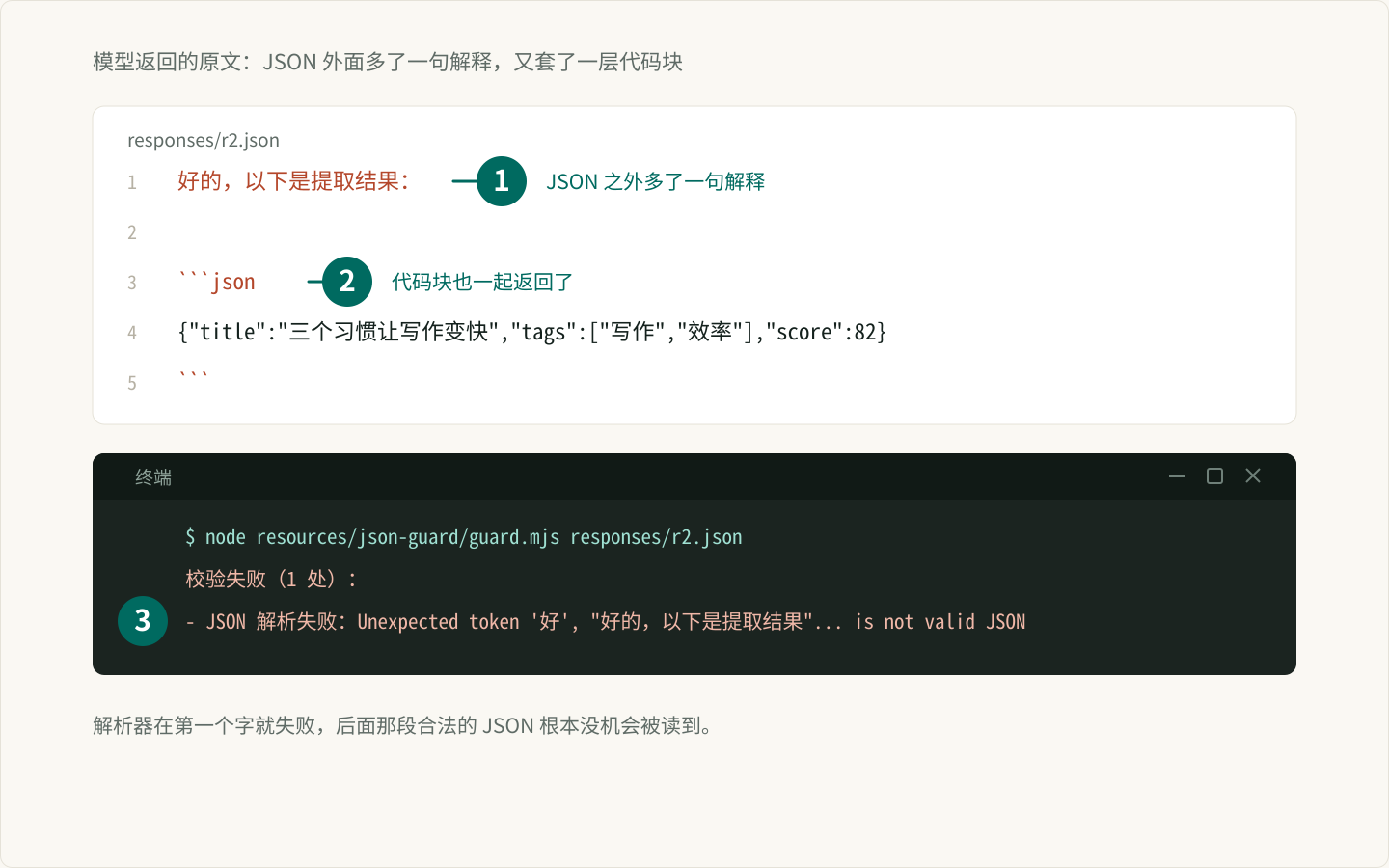
先定 schema
只校验你真正会用的字段:
title: string
tags:  array<string>
score: number,0 到 100
对应脚本里的 ARTICLE_SCHEMA。字段越少越稳;不要一上来校验十几个字段。
写脚本
保存为 resources/json-guard/guard.mjs:
import { readFile } from "node:fs/promises";
import path from "node:path";
import { pathToFileURL } from "node:url";

// 校验模型返回的 JSON:字段类型、数值范围、枚举。
// 解析失败或校验失败都当作失败,交给 guard 做有限重试。

export const ARTICLE_SCHEMA = {
  title: "string",
  tags: { type: "array", items: "string" },
  score: { type: "number", min: 0, max: 100 },
};

function typeOf(value) {
  if (Array.isArray(value)) return "array";
  if (value === null) return "null";
  return typeof value;
}

function check(value, rule, at, errors) {
  if (typeof rule === "string") {
    const actual = typeOf(value);
    if (actual !== rule) errors.push(`${at}: 需要 ${rule},实际 ${actual}`);
    return;
  }

  if (rule.enum && !rule.enum.includes(value)) {
    errors.push(`${at}: 只能是 ${rule.enum.join(" / ")}`);
    return;
  }

  const actual = typeOf(value);
  if (rule.type && actual !== rule.type) {
    errors.push(`${at}: 需要 ${rule.type},实际 ${actual}`);
    return;
  }

  if (rule.type === "array" && rule.items) {
    value.forEach((item, index) => check(item, rule.items, `${at}[${index}]`, errors));
  }

  if (rule.type === "number") {
    if (rule.min !== undefined && value < rule.min) {
      errors.push(`${at}: 不能小于 ${rule.min}`);
    }
    if (rule.max !== undefined && value > rule.max) {
      errors.push(`${at}: 不能大于 ${rule.max}`);
    }
  }
}

export function validate(value, schema, at = "root") {
  const errors = [];
  const actual = typeOf(value);

  if (actual !== "object") {
    return [`${at}: 需要 object,实际 ${actual}`];
  }

  for (const [key, rule] of Object.entries(schema)) {
    if (!(key in value)) {
      errors.push(`${at}.${key}: 缺少字段`);
      continue;
    }
    check(value[key], rule, `${at}.${key}`, errors);
  }

  return errors;
}

export function parseAndValidate(text, schema) {
  let data;
  try {
    data = JSON.parse(text);
  } catch (error) {
    return { ok: false, data: null, errors: [`JSON 解析失败:${error.message}`] };
  }

  const errors = validate(data, schema);
  return { ok: errors.length === 0, data, errors };
}

export async function guard({ generate, schema, attempts = 2, onError } = {}) {
  let lastErrors = [];

  for (let attempt = 1; attempt <= attempts; attempt += 1) {
    const text = await generate(attempt);
    const result = parseAndValidate(text, schema);

    if (result.ok) return { data: result.data, attempts: attempt };

    lastErrors = result.errors;
    onError?.(attempt, result.errors);
  }

  throw new Error(`连续 ${attempts} 次未通过:${lastErrors.join(";")}`);
}

const isDirectRun =
  process.argv[1] &&
  pathToFileURL(path.resolve(process.argv[1])).href === import.meta.url;

if (isDirectRun) {
  const args = process.argv.slice(2);
  const file = args.find((arg) => !arg.startsWith("--"));

  if (args.includes("--demo")) {
    const bad = JSON.stringify({ title: "示例", tags: "不是数组", score: 120 });
    const good = JSON.stringify({ title: "示例", tags: ["标签"], score: 80 });

    const result = await guard({
      schema: ARTICLE_SCHEMA,
      attempts: 2,
      generate: (attempt) => (attempt === 1 ? bad : good),
      onError: (attempt, errors) => {
        console.log(`第 ${attempt} 次:未通过(${errors[0]})`);
      },
    });

    console.log(`第 ${result.attempts} 次:通过`);
  } else if (!file) {
    console.error("用法:node guard.mjs <response.json> 或 node guard.mjs --demo");
    process.exitCode = 1;
  } else {
    const text = await readFile(file, "utf8");
    const result = parseAndValidate(text, ARTICLE_SCHEMA);

    if (result.ok) {
      console.log(`校验通过:${Object.keys(result.data).join(", ")}`);
    } else {
      console.error(`校验失败(${result.errors.length} 处):`);
      result.errors.forEach((error) => console.error(`- ${error}`));
      process.exitCode = 1;
    }
  }
}
三个函数各管一件事:
parseAndValidate:先JSON.parse,再校验;解析失败也返回错误,不抛异常。guard:最多试attempts次,成功就返回;失败把错误交给onError。validate:递归检查类型、数组元素、数值范围和枚举。
看真实输出
先用 --demo 跑一次重试:第一次 tags 类型错,第二次通过。
node resources/json-guard/guard.mjs --demo第 1 次:未通过(root.tags: 需要 array,实际 string)
第 2 次:通过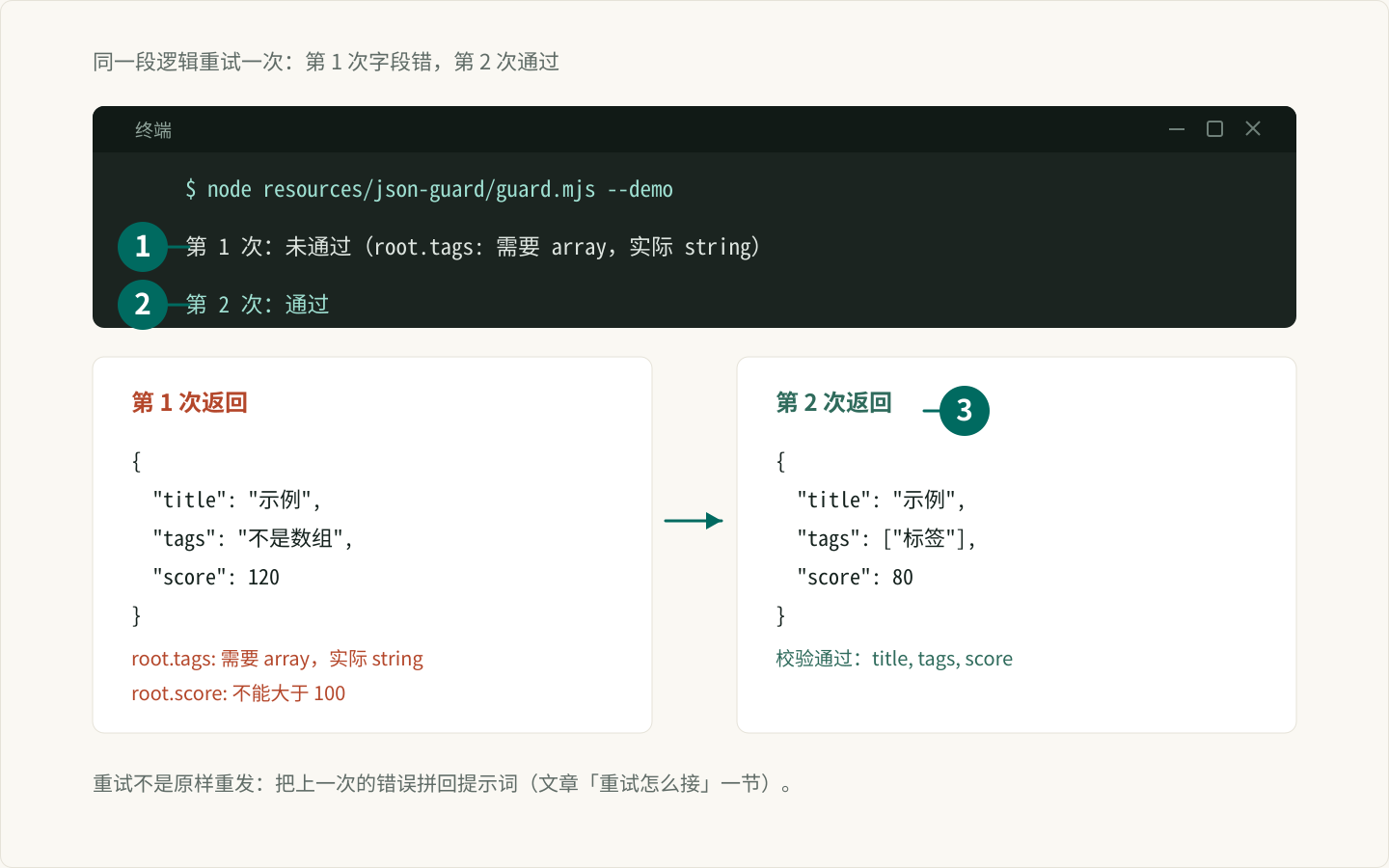
再校验一个真实返回文件 bad.json:
{"title":"示例","tags":"不是数组","score":120}node resources/json-guard/guard.mjs bad.json校验失败(2 处):
- root.tags: 需要 array,实际 string
- root.score: 不能大于 100换成 good.json:
校验通过:title, tags, score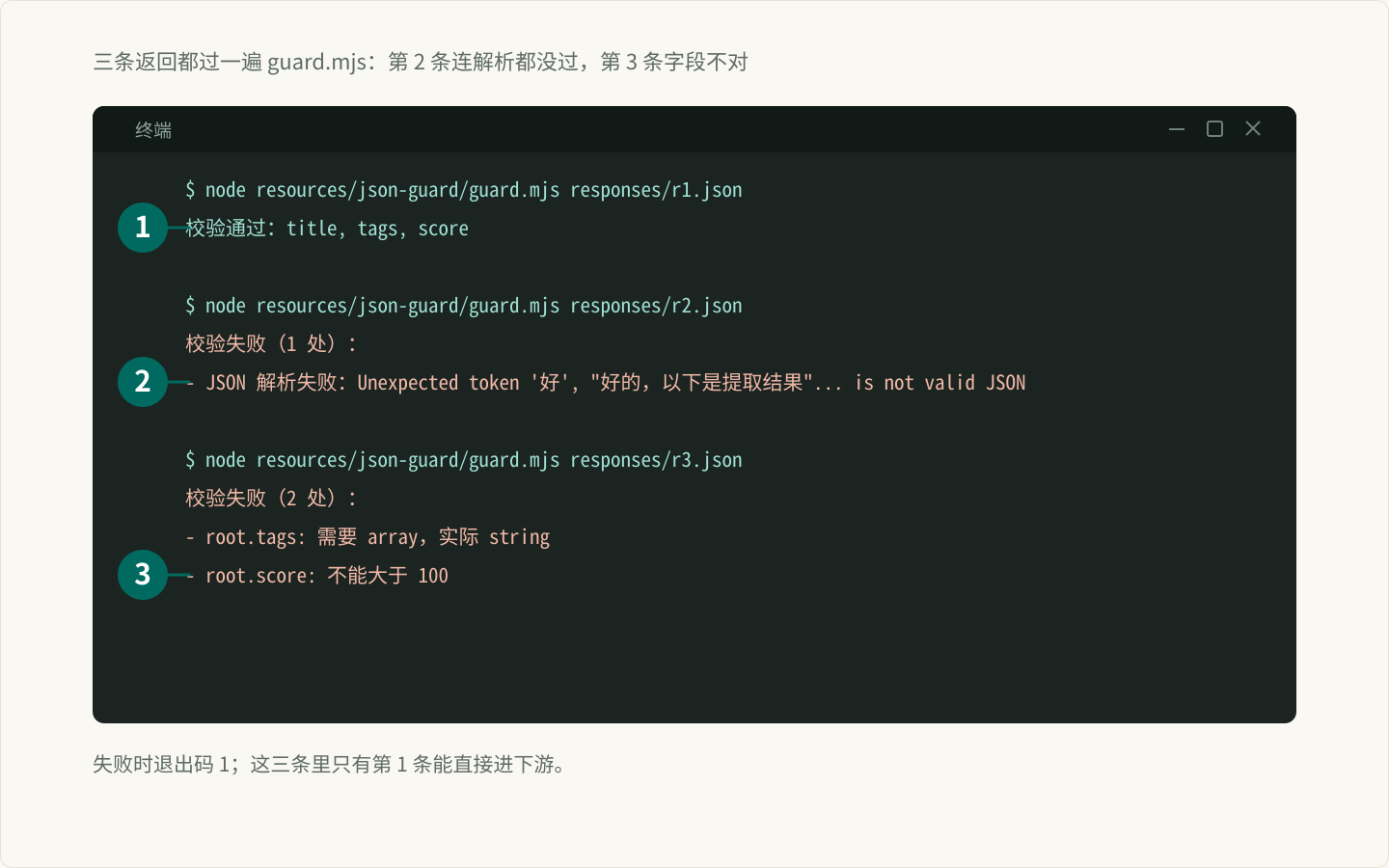
失败时退出码是 1,可以直接接进批处理脚本。
重试怎么接
把模型调用包成一个 generate(attempt) 函数,返回原始文本:
const result = await guard({
  schema: ARTICLE_SCHEMA,
  attempts: 2,
  generate: async () => callModel(prompt),
  onError: (attempt, errors) => log(attempt, errors),
});
重试前最好把 errors 拼进提示词,例如「上次返回的 tags 不是数组,请只输出 JSON 数组」。这比原样重发有效。
提示词也要配合
- 明确写「只输出 JSON,不要 Markdown 代码块」。
- 给出字段名、类型和范围,附一个最小示例。
- 不要让它同时解释理由,解释文字会破坏 JSON。
批量任务里怎么用
- 每条返回先
parseAndValidate,通过再写结果。 - 失败条目把原文和错误写进
failed.jsonl,不要丢。 - 跑完统计通过率;低于 90% 先改提示词,不要靠重试硬扛。
常见坑
1. 只校验顶层
嵌套对象和数组元素也要校验。脚本对 array 会逐个检查 items,对象字段可以继续拆 schema。
2. 无限重试
模型连续两次给错,第三次大概率还是错。设上限,把原始返回和错误落盘,人工看一眼提示词。
3. 不记录原始返回
校验失败时只存错误,不存原文,后面没法判断是模型问题还是解析问题。批量任务里把原文一起写进 failed.jsonl。
4. schema 和提示词不一致
提示词要的字段、脚本校验的字段、下游用的字段,三处必须一致。改一处就三处一起改。
下一步读什么
校验之前,先保证请求本身不会因为一次 429 中断:能重试的 AI API 客户端 管网络层,这篇管返回内容,两层接起来才完整。
这条路线收在批量任务可靠性。
常见问题
为什么不能只写 JSON.parse?
parse 只保证语法合法,不保证字段对。模型可能返回字符串形式的数组、超出范围的分数,或缺字段;这些都会在后续批量处理时变成脏数据。
重试几次合适?
默认 2 次。重试前把校验错误回传给模型,比原样重发更有效;连续失败就落盘人工看,不要无限重试。
需要引入 Zod 吗?
字段少时不必。这个脚本用一个小 schema 覆盖类型、范围和枚举;字段多、嵌套深时再换 Zod 或 JSON Schema。
校验失败的数据去哪了?
脚本只返回错误;批量任务里建议把原始返回和错误一起写进 failed.jsonl,方便回看模型到底错在哪。
每周一张复习表
每周分享一张实用复习表,不收钱不打扰,想走随时走
邮箱存在 Cloudflare KV 里,只用来发每周更新;任何时候写信到hello@genwozuo.com说「退订」就删掉。详见隐私政策。